








 Web Trader MT5











Are you interested in beginning to trade but you are feeling lost with all the complex systems on offer?
Millions of traders around the world use MetaTrader 5 (MT5), which is free. But there’s a catch to it: you should understand how to use it.
Don’t worry. The art of trading does not need to be rocket science.
This guide dissects all the information you need to know about MT5. You will find out how to open your account and begin trading. And don’t worry, it’s going to be simple. So, let’s dive in.
What is MetaTrader 5 (MT5)?
MT5 is a trading software developed by MetaQuotes Software. It links your computer to the servers of your broker. The link will enable you to view live prices and conduct trades in the comfort of your home.
The primary purpose is to simplify trade for every member. There is a lot that you can trade:
- Forex – Purchase and sell currencies such as EUR/USD or GBP/JPY.
- CFDs – Speculating on the rise or fall of traded companies, gold or OIL prices without the asset purchase.
- Stocks – Certain brokers will allow you to purchase actual shares in companies.
- Futures – Contracts to sell or to purchase something at a later time.
MT5 provides you with what you need under one roof. You receive the charts, news, and tools to trade altogether.
Main Features You Should Know About
There are loads of awesome capabilities in MT5. The following are the ones you will use most:
- Charts – View the changes in prices differently. Choose between 1minute and monthly views. Select candlesticks, bars, and plain lines.
- Trading Tools – You will be able to find trends using the built-in indicators. Think Moving Averages and RSI. You may add more when necessary.
- Auto Trading – Have trading robots on your behalf. These are Expert Advisors that could trade when you are asleep.
- Order Types-There is a vast variety beyond buy and sell. Open positions by putting in trades to open or close at a particular price.
- Market News -There is a built-in calendar with crucial news that moves the markets.
- Various Markets-Trade in the forex market, the stock market, as well as in the commodity market, on the same platform. MT5 takes care of all that.
Who typically uses MT5?
There’s a lot of diversity in the crowd. For example:
- Retail Traders: People who manage their own investments from the comfort of their homes.
- Professional Traders: People who need powerful tools because they trade full-time.
- Algorithmic Traders: People who use automated systems for trading (EAs).
- Technical Analysts: People who rely on charts and indicators to make their trading decisions.
Where You Can Get MetaTrader 5
You can use MT5 on almost any device:
- Computer – The full Windows version has all the features. Your broker might have their own version with special extras.
- Phone – Download MT5 apps for iPhone or Android. Check your trades anywhere you go.
- Web Browser – Some brokers offer MT5 that runs in your browser. No download is needed.
How to Get Started
Pick a broker that uses MT5. Go to their website and find the download link. Save the file to your computer. Click it and follow the simple steps – just keep clicking “next.”
Once it’s done, open MT5 and log in with the details your broker gives you. That’s it – you’re ready to trade.
How MetaTrader 5 is Different from MetaTrader 4
There is always the question about the comparison between MT5 and MT4. The MT4 remains in fashion, particularly in forex. However, the more powerful version is MT5.
And here is what makes MT5 superior and unique:
- More Markets – Buy and sell stocks, futures, trade forex, and more on a single platform. MT4 is forex based.
- Better Charts – MT5 has 21-time views compared with 9 of MT4. You can view 2-minute, 3-minute, or 6-hour charts.
- Additional indicators – Better market depth information and indicators to get smarter at trading.
- Built-in News – The economic calendar displays major events that drive the market.
- Better Programming- Develop a higher level of trading robots with MQL5.
- Position Management MT5 employs netting and the majority of the brokers introduce hedging also.
The MT4 is still good, but the MT5 will bring you greater power and possibilities for any kind of trading.
Is MetaTrader 5 Legal in India?
Trading platform rules can get confusing. Let’s break down MetaTrader 5 for India.
Legal Status
MetaTrader 5 is simply a software designed for trading. It is a useful tool for trading. Your choice of broker and method of trading determine the rules that apply.
One thing to remember: India has set financial market regulations. SEBI enforces these guidelines. If you want to trade stocks or derivatives on the Indian market, make sure your broker is licensed by SEBI.
SEBI has not regulated MetaTrader 5. While many brokers around the world use MT5, not all follow the rules required by SEBI. Doing forex or CFD trades through non-SEBI brokers puts users in a legal gray zone in India.
The Reserve Bank of India tells people to be careful of unauthorized forex services. There are concerns in India about money flowing out to margin trade on platforms that do not follow rules.
Always research your local rules before picking any broker or platform.
How to Set Up a Real Account on MetaTrader 5
Now it’s time to trade in the real market. This is where you need to set up your MT5 account. First, take a demo account before you use real money.
Select Your Broker
Select a broker that provides MT5. Look for:
- Proper regulation on the safety of funds
- The markets that you want to trade in
- Reasonable spreads and charges
- Helpful customer service
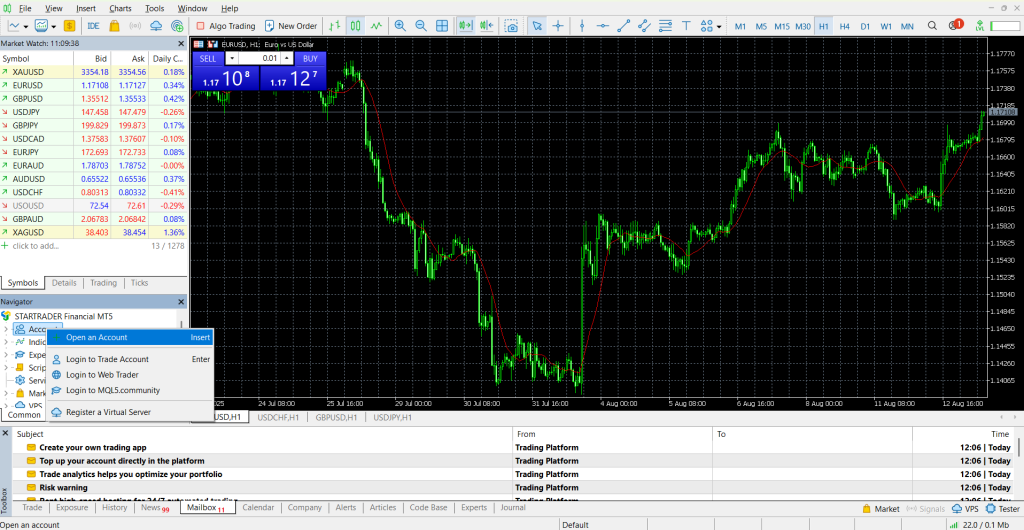
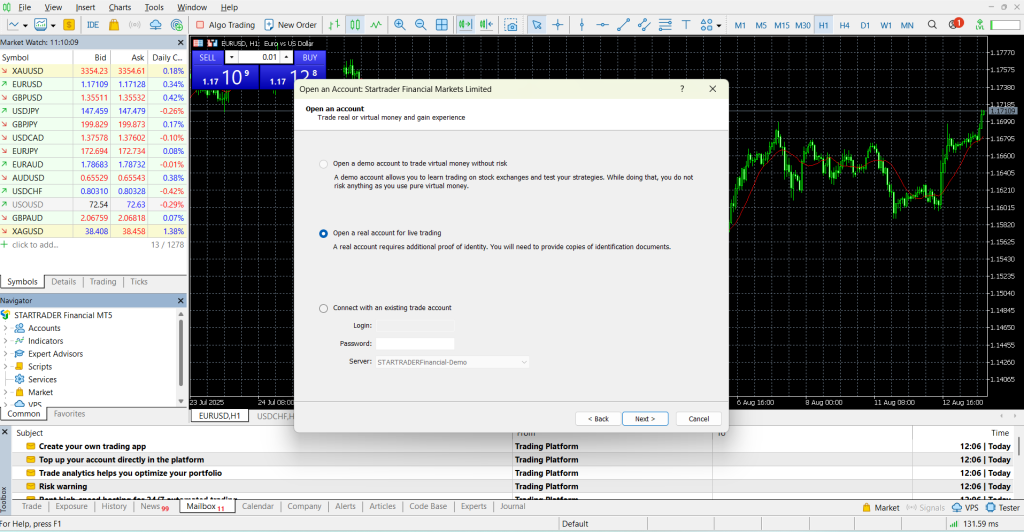
Open Your Account
Visit the broker’s website and click “Open Account.” Fill out the form with your details.
You’ll need to verify your identity with:
- Government ID copy
- Recent utility bill or bank statement
This takes a few hours to days.
Fund Your Account
Log into your broker’s website. Go to deposits and pick a payment method:
- Bank transfer
- Credit/debit cards
- Online payments like PayPal
Enter your amount and confirm. Your funds will appear in MT5 once processed.
That’s it — you’re ready to trade.
How to Trade on MetaTrader 5
You’ve got MT5 set up and your account ready. Now comes the fun part — learning to trade. Let’s walk through the platform and place your first trade.
Getting Around the Platform
When you open MT5, you’ll see several windows. Here are the main ones:
Market Watch Window
This is on the left side. It displays everything that you can trade, such as EUR/USD, Gold, or Apple stock. It will show two prices, either the bid (sell price) or the ask (buy price).
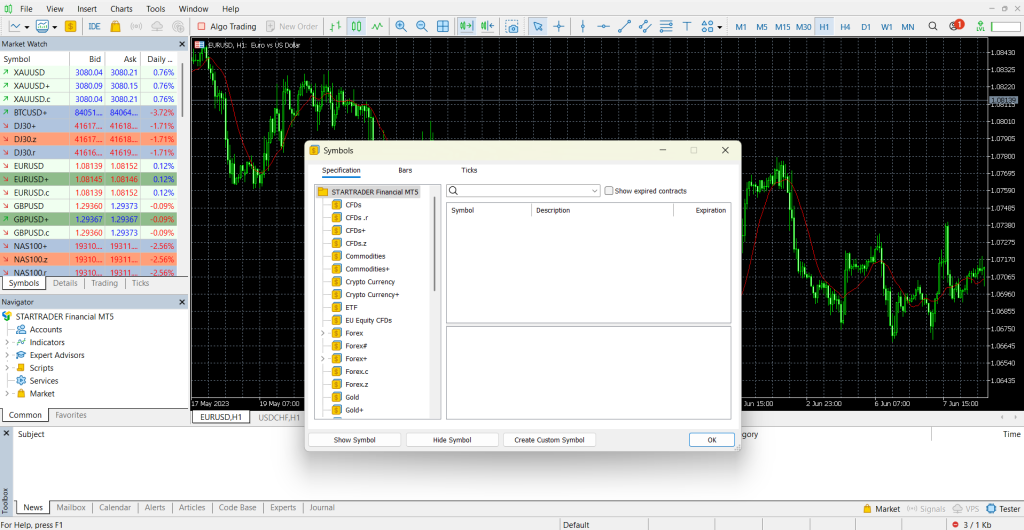
Need to get additional trading facilities? Click right in this window. To locate what you want, choose “Symbols.”
Navigator Window
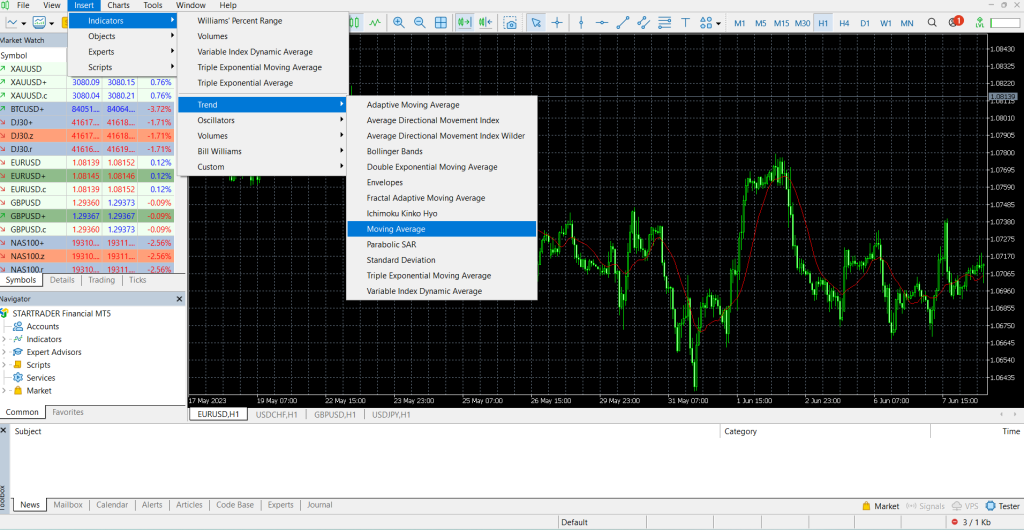
This is under Market Watch. This is where your accounts, indicators, and trading tools are. Here you can drag indicators direct to your charts.
Want a moving average on your graph? Click on “indicators,” then “trend,” locate the “moving average,” then drag it across.
Charts Area
This is the big section in the middle. It shows price movements for whatever you’re watching. You can open multiple charts for different markets or time periods.
You might have one chart showing hourly EUR/USD prices and another showing daily Gold prices.
Terminal Window
This sits at the bottom and has several tabs:
- Trade: Shows your open positions and account balance
- History: Lists all your closed trades
- News: Financial news from your broker
- Journal: Records all platform activity
Placing Your First Trade
Ready to make a move? Here’s how:
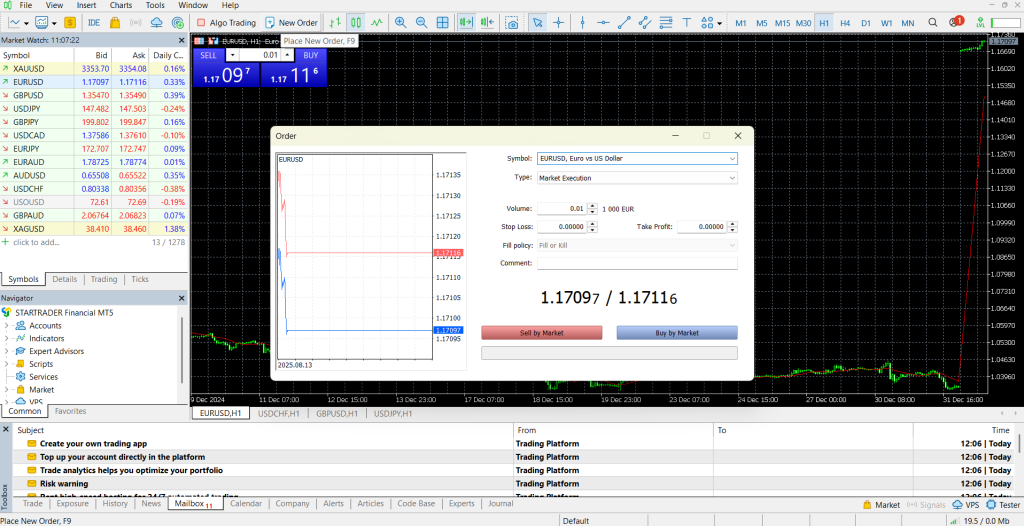
Open the Order Window: You can do this in several ways:
- Double-click any item in Market Watch
- Right-click an item and select “New Order”
- Press F9 on your keyboard
Fill Out the Details
Symbol: Make sure you pick the right market.
Volume: This is your trade size. Start small! For forex, try 0.01 lots (a micro lot). For stocks, maybe 10 shares.
Stop Loss: This closes your trade if prices move against you. It protects you from big losses.
For example, you buy EUR/USD at 1.0850. Set your Stop Loss at 1.0820. If prices drop to 1.0820, your trade closes automatically.
Take Profit: This closes your trade when you’ve made enough profit.
For example, you buy EUR/USD at 1.0850. Set Take Profit at 1.0900. When prices hit 1.0900, you automatically lock in your gains.
Order Types
Market Order: Your order will be done immediately and at today’s prices.
- Pending Orders: Your order is waiting at certain price levels:
- Buy limit: Buy at your prices when it goes down
- Sell Limit: Sell when the prices increase to your level
- Buy Stop: Buy when the prices move above your level
- Sell Stop: Sell price levels that stand below your level
Once you have found the trade you want to make, you may enter it by clicking Buy or Sell. And it will appear on your Terminal screen.
What You Can Trade
MT5 allows you to trade a great variety of markets:
- Forex: The major such as EUR/USD, USD/JPY, and exotic such as USD/TRY.
- CFDs: CFDs are a leveraged instrument where a trader speculates on the movement of the index such as the S&P 500, or other commodities such as Gold Oil, or even individual stocks.
- Direct Stocks and Futures: In case your broker has access to an exchange.
To include new markets, right-click Market Watch, choose Symbols, browse categories, and click Show Symbol.
Tips for New Traders
Begin with Demo Trading — First do demo trading with dummy money. As a new user, you need to use virtual money so that you become accustomed to the platform.
Keep Learning – Study the market basics, technical analysis, and risk management. Access free material online, videos, and courses.
Keep it simple with Charts — Do not put tens of indicators all at once. First, get one or two simple ones and learn how to use them.
Know Leverage — Leverage may increase profits as well as losses. So be cautious, particularly in the initial stages.
Control Your Risk — The main rule to remember is to never risk any money you cannot afford to lose. Never fail to put a stop loss. Determine your risk level in every trade.
Be Patient — Trading is a learning process. Study the instructions and the informational elements of your broker. Such websites as BabyPips and Investopedia are useful.
MT5 users also have great articles and forums on the MQL5 community website. Be patient and learn on a regular basis. That is your best way to succeed in trading.
MetaTrader 5 Features & Tools
MT5 isn’t just for buying and selling. It’s packed with tools to help you analyze markets and manage trades. Let’s check out the most useful features.
Live Charts and Analysis Tools
You’ll spend most of your time here, trying to predict where prices go next.
Real-Time Charts
MT5 gives you live charts that update with every price change. You can switch between 21 different timeframes – from 1-minute charts for quick trades to monthly charts for long-term trends.
Day traders often use 5 or 15-minute charts. Swing traders prefer 4-hour or daily charts
Chart Types
- Line charts: Simple, shows closing prices only
- Bar charts: Show open, high, low, and close prices
- Candlestick charts: Most popular. Green candles mean prices went up, red means they went down
Built-In Indicators
MT5 comes with over 38 technical indicators. These are math formulas that help predict price movements.
Trend Indicators show market direction:
- Moving Averages smooth out price action
- ADX measures trend strength
Oscillators spot overbought or oversold conditions:
- RSI above 70 might mean prices are too high
- MACD shows momentum changes
Drawing Tools You get 44 graphical tools to mark up your charts:
- Draw trendlines and support/resistance levels
- Use Fibonacci retracements to find pullback levels
- Add arrows and text for notes
Account Management
MT5 helps you track your trading account.
Withdrawing Money —You can’t withdraw directly from MT5. Go to your broker’s website and log into your account area. Find the withdrawal section and choose your method.
Terminal Window — This sits at the bottom and shows key account info:
- Trade tab: Current balance, profit/loss, and available margin
- History tab: All your closed trades and deposits
- Journal tab: Records all platform activity
Advanced Features
Market Depth
This shows buy and sell orders at different price levels. It helps you see supply and demand. If you see lots of buy orders clustered below current prices, that level might act as support.
News and Economic Calendar
MT5 includes live financial news in the News tab. The Economic Calendar shows important upcoming events like interest rate decisions or job reports. These events often move markets significantly.
Common Problems and Solutions
Here are common MetaTrader 5 problems and solutions:
“New Order” Button Won’t Work
- Check if you’re logged in properly
- Markets might be closed (stocks have trading hours)
- You might not have permission to trade that instrument
- Try restarting the platform
Charts Not Updating
Usually means connection problems. Check your internet or try reconnecting.
Helpful Tips
Here are helpful tips to remember:
- Make your favorite chart and set up a template
- Learn keyboard shortcuts (F9 switches to the new orders fast)
- Set price alerts so that MT5 informs you that prices reached your price levels
- Use one-click trading so the execution is much quicker (but be careful about this)
The Background of Margin and Leverage
These are important principles of leveraged trading.
Margin is the money required to open positions. It is a kind of deposit, not a fee.
For example, with 1:100 leverage you require a margin of $100 to manage a position worth 10,000 dollars.
Leverage allows you to trade with more positions using less money. It is presented as such ratios as 1:50 or 1:100.
Great leverage translates into greater possible profits; however, it may also lead to greater losses. When opening an account, your broker allocates your account leverage.
Monitor your Margin Level on the Trade page. Your broker can automatically close your positions in the event it becomes too low due to losses.
Start with low leverage as a beginner. High leverage is risky.
Learning Resources
MQL5.community – Official MT5 website with tutorials, forums, and tools.
Your Broker’s Education – Most brokers offer MT5 tutorials and webinars.
Trading Education Sites – BabyPips.com and Investopedia have great beginner guides.
Always double-check information from multiple sources. Stay cautious about where you learn trading strategies.
MT5 has tons of features, but don’t try to use everything at once. Start with basic charts and a few simple indicators. Add more tools as you gain experience.
MetaTrader 4 vs MetaTrader 5
Are you having a dilemma about which platform to choose? MT4 is older and MT5 is a newer and more advanced choice. So let us analyze it.
Quick Comparison
The MT4 was developed to trade forex. It is easy and known to most traders. You receive 9 timeframes, approximately 30 indicators, and simple functions that are good for currency trading.
MT5 covers all – forex, stocks, futures, and options. It provides 21 time frames, 38+ indicators, and numerous sophisticated tools.
Key Differences
What You Can Trade — MT4 is excellent with forex and a limited number of CFDs. MT5 was built to suit any market from the very first day. Feel like trading Apple shares or the EUR/USD currency pair? MT5 manages this in a better way.
Analysis Tools — Analysis Tools in MT5 provide you with additional possibilities to study markets:
- The use of more timeframes (such as 2-minute and 6-hour chart)
- Additional pointers and other tools to draw from
- In-build economic calendar
- High-quality market-depth information
Order Types — MT4 offers 4 pending order types. MT5 gives you two additional entries- Buy Stop Limit and Sell Stop Limit to be more in charge.
Programming and Testing — The programming language in MT5 is more powerful. MT5 can test automated trading systems more precisely and quickly in case you want to create and implement them.
Hedging — Both platforms can now hedge (have buy and sell positions open at the same time on the same pair). Previously it was the strong point of MT4, but MT5 has caught up.
Which Should You Choose?
The best option would be to choose MT4 in case:
- The Forex is the only currency you trade
- You desire the simplest interface
- Your broker will provide better conditions at MT4
Conversely, choosing MT5 would be rather preferable in cases where:
- You desire to trade various markets
- You prefer having greater analysis tools
- You are beginning afresh (more future-proof)
The future is moving to MT5. The company has ceased working on new features for MT4 and concentrates all its efforts on MT5.
MT5 is more suitable for beginners starting now. You will start with the newer platform that receives all the updates and issues.
Final Thoughts
MetaTrader 5 provides you with all you need to become a successful trader. A beginner will find it easy to use, yet it has features to scale with them.
It is these fundamentals you should keep in mind: choose a good broker, study the platform, and control your risks. Most notably, practice on a demo first. Practice and develop confidence without losing actual money.
Become the master of your finances. Download MT5 now and open your demo account for testing. Now it is your turn to start trading, so make it count.
Start your trading journey today with MetaTrader 5 on STARTRADER access powerful tools, trade multiple markets, and practice with a demo before going live.
Tags


Open Live Account
 Email Address
 Phone Number
Important Notice
STARTRADER does not accept any applications from Australian residents.
To comply with regulatory requirements, clicking the button will redirect you to the STARTRADER website operated by STARTRADER PRIME GLOBAL PTY LTD (ABN 65 156 005 668), an authorized Australian Financial Services Licence holder (AFSL no. 421210) regulated by the Australian Securities and Investments Commission.
Important Notice for Residents of the United Arab Emirates
In alignment with local regulatory requirements, individuals residing in the United Arab Emirates are requested to proceed via our dedicated regional platform at startrader.ae, which is operated by STARTRADER Global Financial Consultation & Financial Analysis L.L.C.. This entity is licensed by the UAE Capital Market Authority (CMA) under License No. 20200000241, and is authorised to introduce financial services and promote financial products in the UAE.
Please click the "Continue" button below to be redirected.


